On this page
TL;DRWhat are virtual network labs?What can you practice in a virtual network lab?Which virtual network lab platform should you use?Are virtual network labs free?How do you set up your first virtual network lab?What is a good first virtual network lab example?Do you need a powerful computer for virtual network labs?What are the most common virtual network lab mistakes?A 4-week virtual network lab plan for Network+ and CCNAVirtual network lab checklist: are you ready to start?Our perspectivePractice with SecLernFAQAre virtual network labs free?Can I practice for CCNA with virtual network labs?Do virtual network labs work on a Mac?How much RAM do I need for GNS3 or EVE-NG?What is the difference between a virtual network lab and a physical home lab?Do virtual network labs help with CompTIA Network+ performance-based questions?SourcesRecommendedVirtual network labs are software environments where you build and test a working network: routers, switches, subnets, routes, NAT and firewalls, without owning any physical hardware. You can run them in a browser, in a local simulator such as Cisco Packet Tracer or GNS3, or inside a cloud account like Azure Virtual Network or Amazon VPC. They are the fastest way to practice the hands-on configuration and troubleshooting that CompTIA Network+ and Cisco CCNA test.
TL;DR
- A virtual network lab is a software environment where routers, switches, subnets and firewalls exist as simulated or emulated devices you can configure, break and reset.
- There are three delivery models: browser-based labs, local simulators or emulators (Packet Tracer, GNS3, EVE-NG, Cisco Modeling Labs), and real cloud networks (Azure Virtual Network, Amazon VPC).
- Cisco CCNA 200-301 runs 120 minutes and gives IP Connectivity 25%, its largest domain, so routing labs deserve the most time.
- A free stack of Packet Tracer plus GNS3 or EVE-NG Community Edition is enough for Network+ and most of CCNA.
- Your first lab should be one router, two switches and two PCs across 192.168.10.0/24 and 192.168.20.0/24, then deliberately broken and fixed.
- 8 GB of RAM is a tight minimum for local emulators and 16 GB is comfortable; browser labs need nothing beyond a modern browser.
What are virtual network labs?
A virtual network lab is a software-defined environment where routers, switches, hosts and links exist as simulated or emulated devices you can configure, break and reset without touching physical hardware. The lab lives on your laptop, in a browser tab or in a cloud account, and a reset takes seconds instead of a rebuild.
There are three delivery models, and they are not interchangeable:
- Browser-based labs. The devices run on someone else's servers and you reach them through a browser. Nothing to install, no images to find, no licensing to manage.
- Local simulators and emulators. Cisco Packet Tracer simulates Cisco devices. GNS3 and EVE-NG emulate them by running real network operating system images inside Dynamips, QEMU or VirtualBox. GNS3 describes itself as free, open-source software built for exactly this.
- Cloud virtual networks. Azure Virtual Network and Amazon VPC are not simulators. You build a real, isolated private network with subnets, route tables and gateways inside a cloud region; the network definition itself is free, but the gateways, virtual machines and traffic you attach can bill by the hour.
A physical home lab gives you real cables and real failure modes, but it costs money, draws power and cannot be snapshotted. The trade-off that actually bites is licensing: GNS3 and EVE-NG are free, but the Cisco IOS images you load into them are not yours to download unless you are entitled to them.
One naming trap: cloud documentation uses virtual network to mean a specific service, an isolated private network inside a cloud region. Both senses are correct, and a lab you build in Packet Tracer and a lab you build in Azure are both virtual network labs.
What can you practice in a virtual network lab?
You can practice almost every hands-on objective on CompTIA Network+ (N10-009) and Cisco CCNA 200-301 in a virtual lab, from subnetting and VLANs to OSPF, NAT and ACLs.
- IP addressing and subnetting. Plan ranges from RFC 1918 (10.0.0.0/8, 172.16.0.0/12 and 192.168.0.0/16), check the plan with a free subnet calculator, then apply it. Most "it does not ping" problems start here.
- VLANs, access ports and trunking. Two VLANs per switch, an 802.1Q trunk between them, then inter-VLAN routing with router-on-a-stick or a Layer 3 switch. Network Access is 20% of CCNA.
- Static routing, then OSPF. Cisco's CCNA exam topics put IP Connectivity at 25%, the largest domain, and most of that weight is routing and route selection.
- DHCP, DNS and NAT/PAT. IP Services is 10% of CCNA, and NAT overload is worth practicing because it combines addressing, interfaces and ACLs.
- ACLs and device hardening. SSH instead of Telnet, banners, local users,
service password-encryption. Security Fundamentals is 15% of the exam. - Troubleshooting with show commands.
ping,traceroute,show ip interface brief,show ip routeandshow vlan briefare the tools you will reach for in PBQs. For how those are graded, see CompTIA PBQ practice. - Packet capture. Run Wireshark on a lab link and read the ARP request, the DHCP DORA exchange and the TCP handshake instead of memorizing diagrams.
- Cloud equivalents. Subnets, route tables, security groups and VNet or VPC peering. Not deep on either exam, but they show up in interviews and in Security+ style scenarios.
On Network+ the same ground appears under Networking Concepts, Network Implementation and Network Troubleshooting. If you can build it, you can answer questions about it.
Which virtual network lab platform should you use?
Use a browser-based lab or Cisco Packet Tracer if you are starting out, move to GNS3, EVE-NG or Cisco Modeling Labs when you need real device images, and choose Azure Virtual Network or Amazon VPC if your target role is cloud or hybrid.
| Platform | Type | Cost | Setup effort | Device realism | Best for |
|---|---|---|---|---|---|
| SecLern browser labs | Browser-based, guided | Free tier; Pro $15/month or $99/year | None | Simulated Cisco, Windows and Linux desktop | Network+ and CCNA objectives with no install |
| Cisco Packet Tracer | Local simulator | Free through Cisco Networking Academy | Low (install only) | Simplified Cisco behavior | Absolute beginners, Network+, early CCNA |
| GNS3 | Local emulator | Free, open source | Medium to high (hypervisor plus images) | Real OS images | CCNA and beyond, multi-vendor |
| EVE-NG Community Edition | Local or server emulator | Free Community Edition; paid editions | High (server install, images) | Real OS images | Larger topologies, study groups |
| Cisco Modeling Labs | Cisco's virtual lab platform | Commercial subscription | Medium | Official Cisco virtual images | CCNA to CCNP with sanctioned images |
| Cisco DevNet Sandbox | Hosted reservations | Free with a Cisco account | None | Real Cisco platforms | Trying specific Cisco products and automation |
| Azure Virtual Network / Amazon VPC | Real cloud network | No charge for the network; attached resources bill | Medium | Real cloud networking | Cloud and hybrid roles, SC-500, SAA-C03 |
Packet Tracer is the easiest to install and the least realistic: some commands are simplified and some features are missing. GNS3 and EVE-NG run genuine device operating systems, which means real output, real bugs and a real hunt for images and RAM. Cloud labs teach the networking that cloud roles use, but a forgotten virtual machine or VPN gateway keeps billing after you close the tab.
Who should choose which. Absolute beginners and Network+ candidates: a browser lab plus Packet Tracer. CCNA candidates: Packet Tracer first, then GNS3, EVE-NG or Cisco Modeling Labs when a topic needs real output. Boson NetSim is a paid simulator with a library of guided CCNA and CCNP labs, and it suits people who want a workbook rather than a blank canvas. Cloud-focused roles: Azure Virtual Network or Amazon VPC from day one.
Are virtual network labs free?
Many virtual network labs are free, and a free stack is enough for the hands-on objectives on Network+ and most of CCNA.
Free options. Cisco Packet Tracer is offered at no cost through Cisco Networking Academy. GNS3 is free and open source, EVE-NG publishes a free Community Edition alongside its paid editions, and Cisco DevNet Sandbox offers reservable environments at no cost.
Paid options and why people pay. Cisco Modeling Labs is a commercial subscription, Boson NetSim is a paid simulator, and cloud usage beyond a free tier is billed by the hour or by data. Some study platforms bundle labs with question banks so you never assemble the pieces yourself.
The hidden cost of a free local lab. RAM upgrades, SSD space for images, electricity, and the hours spent fixing the emulator instead of practicing routing. If your time is worth more than a subscription, paying is the cheaper option.
Check the vendor's pricing page before you commit. Prices change, and a number in a blog post goes stale quietly.
How do you set up your first virtual network lab?
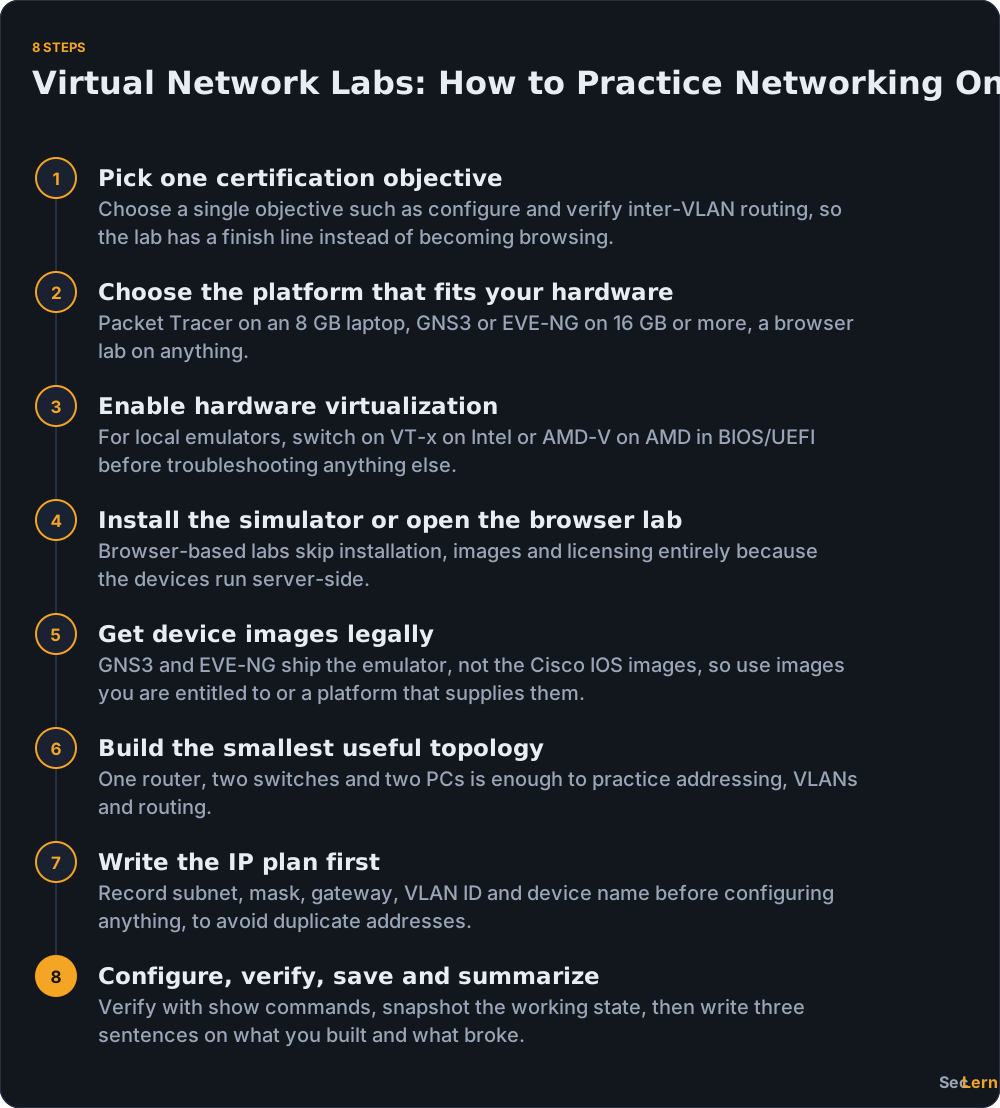
Set up your first virtual network lab in eight steps: choose one objective, pick a platform that fits your hardware, enable virtualization if you go local, install or open the lab, get legal images, build the smallest topology, write the IP plan, then configure and verify. The fastest route is a browser-based lab that skips installation entirely; the most educational route is a local simulator where you own every piece.
- Pick one certification objective. "Configure and verify inter-VLAN routing" is a better starting point than "learn networking", because one objective gives the lab a finish line.
- Choose the platform that fits your hardware. Packet Tracer on an 8 GB laptop, GNS3 on 16 GB, a browser lab on anything.
- Enable hardware virtualization if you are going local. VT-x on Intel or AMD-V on AMD, switched on in BIOS/UEFI. Nothing works until this is on.
- Install the simulator or open the browser tab. SecLern's hands-on labs run on a simulated Cisco, Windows and Linux desktop with no VM or cloud account.
- Get device images legally. GNS3 and EVE-NG ship the emulator, not the Cisco IOS images. Use images you are entitled to, or use a platform that supplies them.
- Build the smallest useful topology. One router, two switches, two PCs. A twenty-device topology you cannot troubleshoot teaches nothing.
- Write the IP plan before you configure. Subnet, mask, gateway, VLAN ID and device name on paper. Duplicate addresses cost more time than most other mistakes.
- Configure, verify, save, and summarize. Snapshot the working state, then write three sentences: what you built, what broke, and how you found it.
Steps 3 to 5 are the ones that stop people. Browser-based labs skip them entirely, which is why they are the right first lab for most readers.
What is a good first virtual network lab example?
A good first virtual network lab is two subnets, 192.168.10.0/24 and 192.168.20.0/24, joined by one router with an interface in each, with one switch and one PC per subnet. It takes about an hour and teaches the verification loop that performance-based questions grade.
- Address the PCs. PC1 gets 192.168.10.10/24 with default gateway 192.168.10.1. PC2 gets 192.168.20.10/24 with gateway 192.168.20.1.
- Address the router interfaces on Cisco IOS:
enable
configure terminal
interface GigabitEthernet0/0
 ip address 192.168.10.1 255.255.255.0
 no shutdown
interface GigabitEthernet0/1
 ip address 192.168.20.1 255.255.255.0
 no shutdown
end- Verify the interfaces.
show ip interface briefshould show both interfaces up/up. If one reads administratively down, you forgotno shutdown. - Verify the routing table.
show ip routeshould list two connected routes, C 192.168.10.0/24 and C 192.168.20.0/24, each on its own interface. - Ping locally, then across. From PC1,
ping 192.168.10.1proves the local segment. Thenping 192.168.20.10proves routing, andtraceroute 192.168.20.10should show the router as the first hop and the PC as the destination.
Then break it on purpose. Shut Gi0/1 with shutdown, delete PC2's default gateway, or give PC2 an address in the wrong subnet (192.168.30.10/24), and time yourself finding the fault using only ping, traceroute and show commands. A missing default gateway is a classic cause of "I can ping my own subnet but nothing else".
That break-and-fix loop is the highest-value part of the hour. Network+ gives troubleshooting its own domain, CCNA folds it into IP Connectivity and IP Services, and PBQs often hand you a broken or half-built network and a clock.
Do you need a powerful computer for virtual network labs?
No for browser labs and Packet Tracer, yes for GNS3 and EVE-NG once you start running real device images.
RAM. Guidance, not a vendor specification: 8 GB is a tight minimum, 16 GB is comfortable for four to six routers, and 32 GB helps if you want a dozen nodes at once. Every node gets its own allocation, and they add up fast.
Disk. Images run from a few hundred megabytes to several gigabytes each. A 256 GB SSD fills faster than people expect once you keep three IOS versions and a Windows VM.
Virtualization support. Confirm VT-x or AMD-V is enabled in BIOS/UEFI before troubleshooting anything else. A guest that refuses to start is usually a virtualization setting, not GNS3.
If your hardware is weak. Use a browser lab that runs devices server-side, reserve a DevNet Sandbox, or rent a small lab server by the month. You do not need a new laptop to practice VLANs.
Mac and Linux. Browser labs and Packet Tracer work on both. GNS3 runs on macOS but usually needs the GNS3 VM alongside it, and EVE-NG is usually deployed as a server VM rather than a desktop app.
What are the most common virtual network lab mistakes?
The virtual network lab mistakes that waste the most time are building a topology too large to troubleshoot and skipping the written IP plan.
- Building too big, too early. Three devices you can explain beat twelve you cannot. Grow the topology only when the current one feels boring.
- Skipping the IP plan. Duplicate addresses and overlapping subnets produce symptoms that look like routing bugs and cost an hour to find.
- Pasting configurations you cannot explain. If you cannot say what
switchport mode trunkchanges, you practiced typing, not networking. - Never breaking anything. A lab where everything works first time teaches almost nothing. Inject one fault per session.
- Forgetting to save or snapshot. Rebuilding a working topology from memory is not practice, it is punishment.
- Hoarding platforms. Five half-finished labs on five tools is worse than one finished series in Packet Tracer.
- Ignoring cloud networking. VNet and VPC basics appear in interviews and security scenarios even when your exam skips them.
- Practicing without a timer. Exams are timed: Cisco's CCNA exam topics page gives 120 minutes for 200-301, and CompTIA's Network+ page lists a maximum of 90 questions with a 90-minute limit. Build the habit of working against a clock.
A 4-week virtual network lab plan for Network+ and CCNA
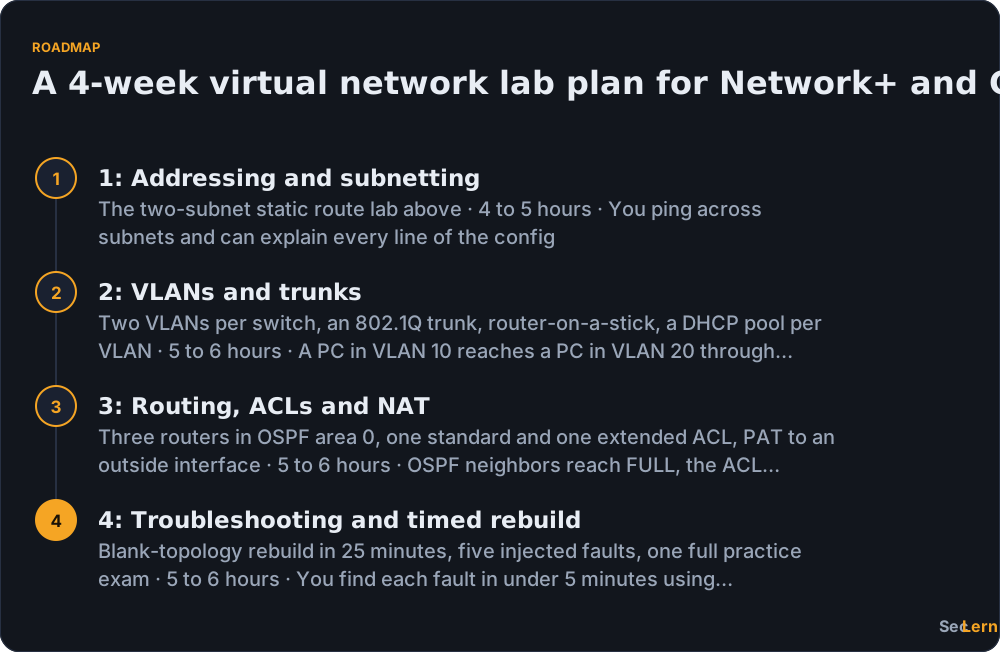
A four-week plan works if you treat each week as a finish line rather than a reading list: about five hours per week, one lab series per week, and a timed troubleshooting drill at the end. If you are fitting this around a full-time job, see how to study while working full time for a plan that protects the hours.
| Week | Focus | Labs to build | Time | Done looks like |
|---|---|---|---|---|
| 1 | Addressing and subnetting | The two-subnet static route lab above | 4 to 5 hours | You ping across subnets and can explain every line of the config |
| 2 | VLANs and trunks | Two VLANs per switch, an 802.1Q trunk, router-on-a-stick, a DHCP pool per VLAN | 5 to 6 hours | A PC in VLAN 10 reaches a PC in VLAN 20 through one router interface |
| 3 | Routing, ACLs and NAT | Three routers in OSPF area 0, one standard and one extended ACL, PAT to an outside interface | 5 to 6 hours | OSPF neighbors reach FULL, the ACL blocks one host only, PAT translates |
| 4 | Troubleshooting and timed rebuild | Blank-topology rebuild in 25 minutes, five injected faults, one full practice exam | 5 to 6 hours | You find each fault in under 5 minutes using show commands |
Repeat any week that did not feel automatic. Keep a one-page log of every fault you fixed and the command that found it; that log becomes your revision guide in the last 48 hours before the exam.

Virtual network lab checklist: are you ready to start?
Run this checklist before, during and after each lab. It is short enough to paste into a notes app.
Before you start
- One certification objective written down, with the exam code next to it. Reason: a lab without a finish line becomes browsing.
- Platform chosen to match your hardware. Reason: installing GNS3 on 8 GB is a weekend you will not get back.
- Hardware virtualization confirmed if you are going local. Reason: it is the first thing to check and the last thing people check.
- Device images you are legally entitled to use. Reason: licensing is the one part of a free lab that is not free.
During the lab
- IP plan written before configuration. Reason: it prevents the fault class that wastes the most time.
- Smallest topology that demonstrates the objective. Reason: you must be able to troubleshoot every device you add.
- Verification at each layer: link, address, route, then application. Reason: it localizes faults instead of guessing.
- Save or snapshot the working state. Reason: you are about to break it on purpose.
After the lab
- One deliberate fault injected and fixed. Reason: troubleshooting is what the exams weight.
- Fault logged with the command that found it. Reason: it becomes your revision sheet.
- Three-sentence summary written. Reason: if you cannot explain it, you cannot answer a scenario question about it.
- Next lab scheduled. Reason: momentum is the whole game.
Our perspective
We built SecLern around a blunt observation: people rarely fail a networking exam because they cannot remember what a trunk port is. They fail because they have never watched a ping die and had to work out why. Reading about OSPF adjacencies is cheap; building three routers, breaking one hello timer and timing yourself to find it is what sticks. That is why our labs run in the browser instead of asking you to hunt for IOS images and spare RAM. The honest trade-off: a simulated Cisco desktop is not a rack of 2960s. If you are heading for CCNP, you will eventually want GNS3, EVE-NG or Cisco Modeling Labs with real images. Start simulated, graduate to emulated.
Practice with SecLern
SecLern's hands-on labs run in the browser on a simulated Windows, Linux and Cisco desktop, so you can configure interfaces, VLANs and routes without a VM or a cloud account. Pair them with the CompTIA Network+ (N10-009) study page and Cisco CCNA (200-301) study page. The free tier includes the first module of each path, 3 labs and PBQs, and 30 questions a day, with no card required. Pro is $15 a month or $99 a year with a 7-day trial.
FAQ
Are virtual network labs free?
Many are. Cisco Packet Tracer is free through Cisco Networking Academy, GNS3 and EVE-NG Community Edition are free to download, and Cisco DevNet Sandbox offers reservable environments at no cost. Paid options include Cisco Modeling Labs, Boson NetSim and cloud usage beyond a free tier. A free stack is enough for Network+ and most of CCNA, but check each vendor's page for current terms.
Can I practice for CCNA with virtual network labs?
Yes, and you should. Cisco's CCNA 200-301 exam topics weight IP Connectivity at 25%, the largest domain, and IP Services at 10%, and both are configuration and verification skills. Packet Tracer covers most CCNA labs; switch to GNS3, EVE-NG or Cisco Modeling Labs when a topic needs real device output or features the simulator simplifies.
Do virtual network labs work on a Mac?
Browser-based labs work on any modern operating system, including macOS. Packet Tracer is available for Windows, macOS and Linux. GNS3 has a macOS client but usually needs the GNS3 VM running alongside it, and EVE-NG is usually deployed as a server VM rather than a desktop app.
How much RAM do I need for GNS3 or EVE-NG?
As guidance rather than a vendor specification: 8 GB is a tight minimum, 16 GB is comfortable for four to six routers, and 32 GB helps for larger topologies. Disk matters too, since each image can run from hundreds of megabytes to several gigabytes. Confirm the current requirements in the GNS3 and EVE-NG documentation.
What is the difference between a virtual network lab and a physical home lab?
A physical home lab uses real routers and switches, so you get real boot times, real cabling and real hardware faults. A virtual lab simulates or emulates those devices in software, so it costs nothing in hardware, resets in seconds and can be snapshotted. The trade-off is that virtual devices can behave differently from hardware, and local emulators still need legal images.
Do virtual network labs help with CompTIA Network+ performance-based questions?
Yes, they are the closest thing to PBQ practice. Network+ performance-based questions ask you to configure and troubleshoot rather than recall, and a lab forces the same loop: read a topology, apply a configuration, verify with show commands, fix what is broken. Practicing that loop against a timer beats reading another chapter.
Sources
- Cisco Packet Tracer: Cisco Networking Academy
- CCNA Exam Topics: Cisco Learning Network
- CompTIA Network+ Certification
- GNS3: Network simulation software
- EVE-NG Community Edition
- Cisco Modeling Labs: Cisco DevNet
- Cisco DevNet Sandbox
- What is Azure Virtual Network? (Microsoft Learn)
- What is Amazon VPC? (AWS Documentation)
- RFC 1918: Address Allocation for Private Internets