On this page
TL;DRWhat is a Windows Server lab, and who needs one?Which Windows Server lab option fits your goal?How do you set up a Windows Server lab at home?Is a Windows Server lab free? Licensing, evaluation and dev/testCan you do Windows Server labs online for free?What should you practice in a Windows Server lab?Where can you find free Windows Server lab exercises, PDFs and GitHub repos?Which certifications do Windows Server labs help you pass?How should you plan four weeks of Windows Server labs?What are the most common Windows Server lab problems?Our perspectivePractice with SecLernFAQDo I need to buy a Windows Server license to run a lab?How much RAM do I need for a Windows Server lab?Can I do Windows Server labs online without installing anything?How long does it take to build a Windows Server lab from scratch?Are old Windows Server 2016 or 2019 lab PDFs still useful?Can I run Windows Server labs on a Mac?SourcesRecommendedWindows Server labs are practice environments for installing, configuring and breaking Windows Server without risk: a local VM, a cloud instance or a browser sandbox. You rehearse what admins do daily, from Active Directory and DNS to Group Policy, file permissions and PowerShell. Build one free in an afternoon with Microsoft's 180-day evaluation image on Hyper-V; most beginners need a domain controller, a member server, a client VM and about four weeks of exercises.
TL;DR
- A Windows Server lab is an isolated VM, cloud instance or browser sandbox where you practice AD DS, DNS, DHCP, Group Policy, file permissions and PowerShell safely.
- The free route is Microsoft's 180-day evaluation image, which needs no product key, running on Hyper-V, which needs Windows Pro, Enterprise or Education.
- Three machines are enough: DC01 for AD DS and DNS, SRV01 for file services and IIS, and CL01 joined to the domain, at about 4 GB of RAM each.
- Browser labs start in minutes and need no hardware; a local VM keeps a domain running for months.
- CompTIA A+ Core 2 (220-1202) weights Operating Systems at 28%, its largest domain, and those objectives map straight onto lab tasks.
- Checkpoint before every exercise, because break/fix drills teach more than clean installs and a snapshot is your undo button.
What is a Windows Server lab, and who needs one?
A Windows Server lab is an isolated environment where you install, configure and break Windows Server without risking a production network. It runs on a laptop you already own or in a browser tab.
The three formats:
- Local VM. Windows Server runs inside Hyper-V or VirtualBox on your machine. Cheapest over months, and the only format that gives you a multi-machine domain you fully control.
- Cloud VM. A Windows Server instance in Azure or AWS. Real cloud skills, but it bills by the hour.
- Browser sandbox. A simulated Windows desktop with guided tasks. No install, but the machines do not persist between sessions.
Labs cover Active Directory Domain Services (AD DS), DNS, DHCP, Group Policy, file services, IIS, PowerShell, patching and backup.
Who needs one: helpdesk and junior sysadmin job seekers, CompTIA A+ (220-1202) and Security+ candidates, and admins moving into hybrid work. What it is not: a server rack, a second PC or a purchased license. One 16 GB laptop is enough. New to practice environments? Read operating system labs: what to practice and how to start.
Which Windows Server lab option fits your goal?
The right Windows Server lab option depends on your hardware and your deadline: Hyper-V or VirtualBox if you want a persistent domain, Azure or a browser lab if you lack 16 GB of RAM or need to start today.
| Option | Cost | Setup time | Hardware | Best for |
|---|---|---|---|---|
| Hyper-V (Windows Pro, Enterprise or Education) | Uses the Windows license you own | 1 to 2 hours for the first VM | 64-bit CPU with virtualization on, 16 GB RAM | A permanent DC01, SRV01 and CL01 domain |
| Oracle VM VirtualBox | Free and open source | 1 to 2 hours | Windows Home, Linux or an Intel Mac | Hosts that cannot run Hyper-V |
| Azure VM, pay as you go | Hourly price, Windows Server license included | About 20 minutes | A browser | Cloud skills without local RAM |
| Microsoft Learn sandboxes | Free | Minutes | A browser | Guided concepts; resets at module end |
| Browser-based lab platform such as SecLern | Free tier, Pro at $15 a month | Minutes | A browser | Drilling tasks and PBQs before an exam |
| Exercise PDFs and GitHub repos | Free | After you have an environment | None | Task lists once the lab exists |
| Old PC or second-hand server | Hardware plus power | A day | Space and quiet | A lab that stays on |
Setup times are typical, not promises.
- No spare RAM. Three VMs need about 12 GB, and an 8 GB laptop will thrash.
- Windows Home. Hyper-V needs Pro, Enterprise or Education, per Microsoft's enable Hyper-V page. VirtualBox does not care.
- Hybrid admin role in mind. Run Windows Server in Azure, because the portal work is half the job.
- Exam in three weeks. Skip the build and use a browser lab plus an exercise list.
How do you set up a Windows Server lab at home?
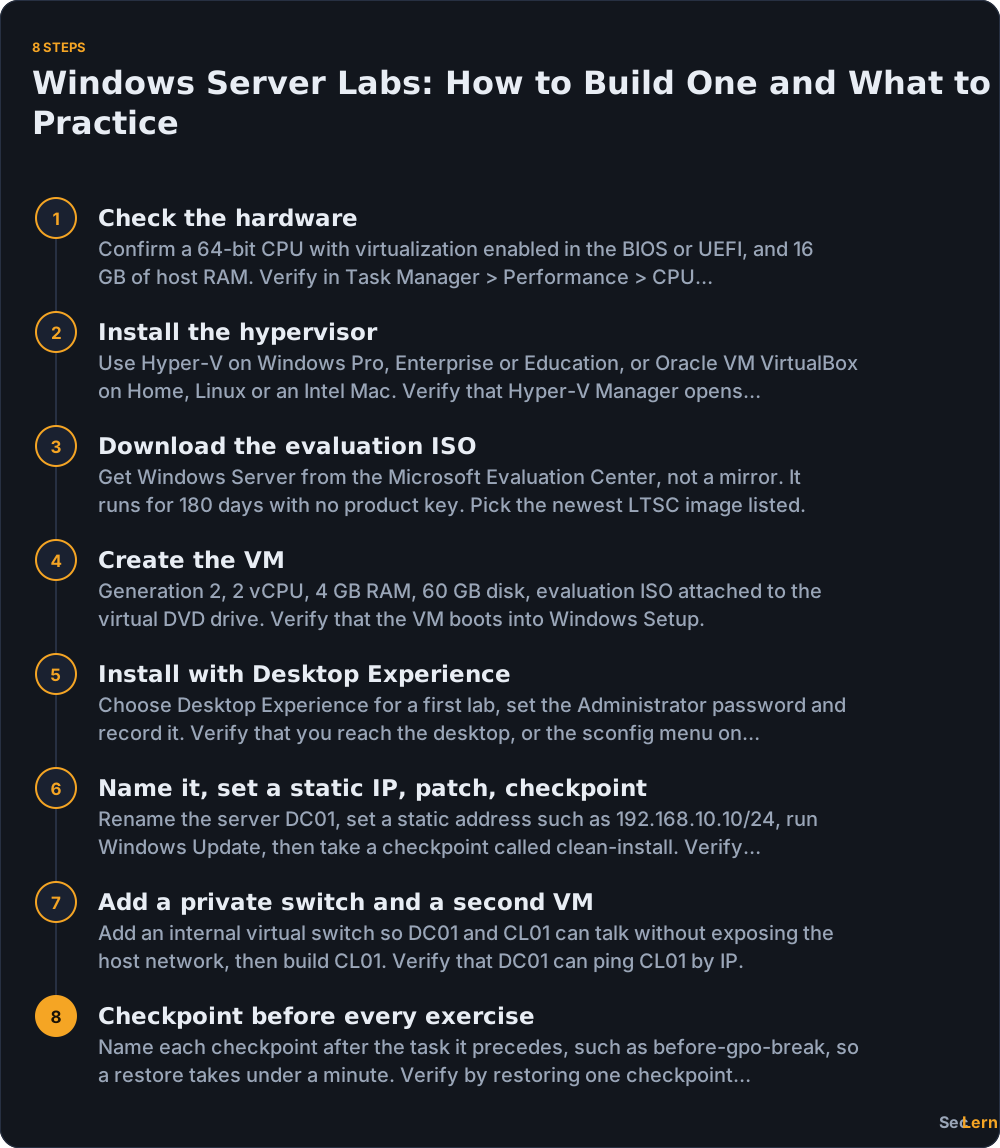
You can set up a Windows Server lab at home in about two hours: install a hypervisor, download the evaluation ISO, create a Generation 2 VM with 2 vCPU, 4 GB RAM and a 60 GB disk, install with Desktop Experience, then set a static IP and take a checkpoint.
- Check the hardware. A 64-bit CPU with virtualization enabled in the BIOS or UEFI, and 16 GB of host RAM. Microsoft's hardware requirements list 1.4 GHz, 512 MB RAM and 32 GB disk, which is a floor, not a usable lab. Verify: Task Manager > Performance > CPU shows virtualization enabled.
- Install the hypervisor. Hyper-V ships with the Pro, Enterprise and Education editions of Windows. On Home, Linux or an Intel Mac, use Oracle VM VirtualBox. Verify: Hyper-V Manager opens without errors.
- Download the evaluation ISO. Use the Microsoft Evaluation Center, not a mirror; it runs 180 days with no product key. Pick the newest LTSC image listed. Verify: the file ends in .iso.
- Create the VM. Generation 2, 2 vCPU, 4 GB RAM, 60 GB disk, ISO attached to the virtual DVD drive. Verify: setup starts.
- Install with Desktop Experience. Choose Desktop Experience for a first lab, set the Administrator password and write it down. Verify: you reach the desktop, or the sconfig menu on Server Core.
- Name it, set a static IP, patch, checkpoint. Rename it DC01, use an address such as 192.168.10.10/24, run Windows Update, then checkpoint as clean-install. Verify: ipconfig shows the static address.
- Add a private switch and a second VM. An internal switch lets DC01 and CL01 talk without exposing your host network. Verify: DC01 pings CL01 by IP.
- Checkpoint before every exercise. Name each one after the task, such as before-gpo-break. Verify: restore one and the VM boots normally.
Minimum viable lab: DC01 (AD DS, DNS, DHCP), SRV01 (file services, IIS) and CL01. Do not build five VMs on day one.

Is a Windows Server lab free? Licensing, evaluation and dev/test
Yes, for 180 days. Windows Server evaluation editions are free to download and run without a product key; after that you license the install, rebuild from a checkpoint, or move to a pay-as-you-go Azure VM where the license is inside the hourly price.
- Evaluation edition. The Microsoft Evaluation Center publishes images that run 180 days with no key. Download there and nowhere else.
- At expiry, rebuild instead of fighting activation. Keep a base checkpoint or an exported VM and refresh the lab every few months.
- Azure bundles the license. On pay-as-you-go Windows VM pricing, the Windows Server license is included in the hourly rate. Cheap for two hours, expensive if you forget to shut it down.
- Azure Hybrid Benefit lets organizations apply existing eligible Windows Server licenses to Azure VMs (details).
- Dev/test use. Visual Studio subscriptions can include Windows Server for development and test; check your subscription level before assuming it covers a lab (Visual Studio subscriptions).
- Licensing is per core. Microsoft's Windows Server licensing page sets minimum cores per processor and per server. Those rules change, so read that page rather than a blog post, including this one.
- Avoid production keys in a lab, ISOs from random mirrors and "activator" tools. A 180-day evaluation plus snapshots is legal, free and enough for any certification.
Prices and free-tier terms change often, so check the official pages before you budget.
Can you do Windows Server labs online for free?
Partly. Free Windows Server practice online comes in three forms: sandboxes inside Microsoft Learn modules, a browser-based lab platform, and the Azure free account, which gives you a real server that starts billing when the credit runs out.
- Microsoft Learn. Microsoft Learn's free training includes self-paced modules, some with hosted sandboxes that reset when the module ends. Good for concepts, not for a domain you keep.
- Azure free account. The Azure free account includes credit for an initial period plus a limited set of free services, and the terms change. A Windows Server VM is not one of the always-free services, so set a budget alert and delete the whole resource group; disks and public IPs bill separately.
- Browser labs. SecLern's hands-on labs in your browser run on a simulated Windows, Linux and Cisco desktop with no VM and no cloud account, and the free tier includes 3 labs and PBQs.
- What online labs cannot do. Kernel-level work, long-lived multi-machine domains and custom networking between VMs. If networking is the gap, virtual network labs covers the topology side.
Online labs are the fastest way to start today. A local VM is the cheapest way to keep a domain for months.
What should you practice in a Windows Server lab?
In a Windows Server lab, practice the tasks that appear in both job ads and exam objectives, on the smallest topology that supports them: DC01 running AD DS and DNS, SRV01 running file services and IIS, and CL01 joined to the domain.
- AD DS. Install the role, promote DC01 into a new forest, create OUs for Users, Computers and Groups, add users and groups, join CL01. Console: Active Directory Users and Computers. PowerShell:
New-ADUser,Add-ADGroupMember. - DNS. Forward and reverse zones, A and PTR records, forwarders; then delete a record on purpose and watch name resolution fail.
nslookupconfirms it. - DHCP. A new scope, address range, a reservation by MAC address, and options 003 (router) and 006 (DNS).
Get-DhcpServerv4Scopeproves the scope exists. - Group Policy. Domain password and lockout policy, then an OU-level GPO with a drive map and restricted groups. Prove it with
gpupdate /forceandgpresult /r. - File services. NTFS versus share permissions, inheritance,
icaclsoutput, quotas and a DFS namespace if you have time. - IIS. A site, a binding on 443/TCP, a self-signed certificate and a redirect from 80/TCP.
- PowerShell. Repeat every task above as a command:
New-SmbShare,New-NetFirewallRule,Get-WinEvent. - Monitoring and backup. Event Viewer, Performance Monitor, Windows Server Backup and Windows Admin Center, Microsoft's free browser-based management tool.
- Hardening. Firewall rules, audit policy, BitLocker, disabling SMBv1 and removing stale accounts.
- Patching. Windows Update on each server, or WSUS for the extra exercise.
Do every task twice, once in the GUI and once in PowerShell, because the exam and the job both expect you to read a console and type a command. Then run break/fix drills: delete a DNS record, misconfigure a GPO, break share permissions, and restore the checkpoint after.

Where can you find free Windows Server lab exercises, PDFs and GitHub repos?
You can find free Windows Server lab exercises in Microsoft Learn paths, Microsoft's role documentation, community GitHub repos and university course PDFs, but treat them as task lists rather than environments.
- Microsoft Learn paths. Free, structured, version-current, and some modules include sandboxes.
- Microsoft's step-by-step docs. Each role has a deployment guide with the exact commands.
- Community GitHub repos. Useful task collections; quality and version coverage vary widely.
- University course PDFs. Good sequencing, dated screenshots.
Vet any list in 30 seconds:
- Does it name the Windows Server version?
- Is the last commit or publication date within the current OS generation?
- Does it match the current objectives for your certification?
- Does it need a paid platform or a license you do not have?
Old manuals are not dead weight: a 2016 or 2019 lab manual still works for AD DS, DNS, DHCP, Group Policy and NTFS permissions, because those wizards have barely changed. Skip version-specific pages, then pick one list and stop collecting PDFs. The exercises in the previous section are already a full curriculum.
Which certifications do Windows Server labs help you pass?
Windows Server labs train directly for five credentials: CompTIA A+ Core 2 (220-1202), CompTIA Security+ (SY0-701), Microsoft AZ-900, Microsoft SC-500 and the Windows Server Hybrid Administrator Associate, earned through exams AZ-800 and AZ-801 (Microsoft's certification page).
| Certification | Exam code | What the lab trains | Published domain weight |
|---|---|---|---|
| CompTIA A+ Core 2 | 220-1202 | Accounts, permissions, Group Policy, OS troubleshooting | Operating Systems 28%, the largest domain |
| CompTIA Security+ | SY0-701 | Hardening, audit policy, firewall rules, account management | Security Operations 28%, Security Architecture 18% |
| Microsoft Azure Fundamentals | AZ-900 | Running Windows Server as an Azure VM; cloud concepts | See Microsoft's current study guide |
| Microsoft SC-500 (Cloud and AI Security) | SC-500 | Hardening cloud workloads and identities | See Microsoft's current study guide |
| Windows Server Hybrid Administrator Associate | AZ-800 and AZ-801 | Identity, networking, storage, hybrid management | Built for Windows Server admins |
CompTIA's A+ page lists Operating Systems at 28% of Core 2, which is why permissions, accounts and GPO drills pay off fastest. If A+ is your target, the CompTIA A+ Core 2 (220-1202) study page maps objectives to practice tasks, and the AZ-900 Azure Fundamentals study page covers the cloud half.
Career note. Hiring managers ask what you built, not what you watched. Write the lab up as one page: topology, roles installed and one problem you fixed.
How should you plan four weeks of Windows Server labs?
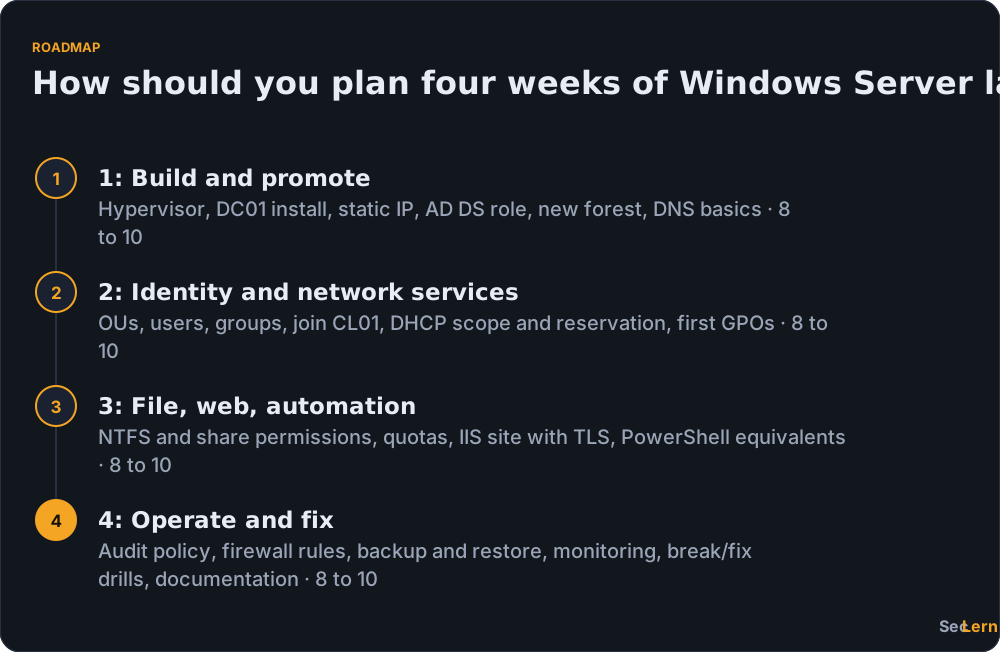
Plan four weeks at 8 to 10 hours a week, or spread the same order over eight weeks at 5 hours a week; the order matters more than the pace, because each week builds on the machines from the week before.
| Week | Focus | Lab tasks | Hours (estimate) |
|---|---|---|---|
| 1 | Build and promote | Hypervisor, DC01 install, static IP, AD DS role, new forest, DNS basics | 8 to 10 |
| 2 | Identity and network services | OUs, users, groups, join CL01, DHCP scope and reservation, first GPOs | 8 to 10 |
| 3 | File, web, automation | NTFS and share permissions, quotas, IIS site with TLS, PowerShell equivalents | 8 to 10 |
| 4 | Operate and fix | Audit policy, firewall rules, backup and restore, monitoring, break/fix drills, documentation | 8 to 10 |
Those hours are estimates based on the task count, not a rule. If a week slips, move the tasks, not the sequence. Restore a checkpoint at the start of every session so you never debug last week's damage instead of practicing this week's task.
What are the most common Windows Server lab problems?
Most Windows Server lab failures come from five causes: boot order, virtual switch type, DNS pointing at the wrong server, too little RAM and a missing static IP.
- The VM will not boot from the ISO. Check that the ISO is attached to the virtual DVD drive and that the Generation 2 Secure Boot template is set to Microsoft Windows.
- The VM has no internet. A Default or External virtual switch gives outbound access. On locked-down Wi-Fi adapters, use an Internal switch plus NAT.
- CL01 cannot join the domain. The client's DNS must point at DC01, not your router. That single setting causes most "domain not found" errors; confirm with
ipconfig /all. - The domain controller is slow or its clock drifts. Give it 4 GB of RAM, keep the VM disk on an SSD, and disable host time synchronization if DC01 is authoritative in your lab.
- Promotion to a domain controller fails. Set a static IP and an Administrator password first; those are the two usual blockers when
Install-ADDSForestrefuses to run. - RDP is refused. Enable Remote Desktop and the matching firewall rule, then test from CL01 with
mstsc. - The evaluation expired. Restore your base checkpoint or rebuild. This is why you keep one.
Our perspective
We built SecLern around a boring observation: people rarely fail Windows labs because the install is hard. They fail because they build the lab and then stare at it. The install takes two hours; deciding what to practice takes longer, which is why the exercise list matters more than the hypervisor you pick. Our honest trade-off: a browser lab is the fastest way to rehearse a task list before an exam, but it cannot replace a real multi-VM domain when you are working toward AZ-800, where you need to feel DNS break the moment a client points at the wrong server. Build the local lab once, then use guided labs for repetition.
Practice with SecLern
SecLern's hands-on labs in your browser put you on a simulated Windows desktop with tasks graded on completion, so you can rehearse account changes, permissions and firewall rules without building a VM. The free tier includes 3 labs and PBQs, 30 questions a day and unlimited flashcards, no card required. Pro is $15 a month or $99 a year with a 7-day trial and unlocks every lab, PBQ and full timed simulation; Exam Sprint is $29 once for 90 days. If A+ Core 2 is your goal, start on the CompTIA A+ Core 2 (220-1202) study page and see pricing for the rest.
FAQ
Do I need to buy a Windows Server license to run a lab?
No, not for 180 days. The Microsoft Evaluation Center publishes Windows Server evaluation images that run without a product key for 180 days, which is longer than most study plans. After that, license the install, rebuild from a checkpoint, or use a pay-as-you-go Azure VM where the Windows Server license is included in the hourly price.
How much RAM do I need for a Windows Server lab?
Microsoft lists 512 MB as the minimum for Windows Server, but that is not usable. Give each VM 4 GB: a domain controller, a member server and a client add up to about 12 GB, so 16 GB of host RAM is comfortable. With 8 GB, run one or two VMs at a time and shut down the rest.
Can I do Windows Server labs online without installing anything?
Yes. Microsoft Learn modules include hosted sandboxes that reset when the module ends, and browser-based labs run a simulated Windows desktop with no VM and no cloud account. Both are free to start. Neither gives you a permanent domain, so add a local VM if you need machines that survive between sessions.
How long does it take to build a Windows Server lab from scratch?
About one to two hours for the first Hyper-V VM, assuming the ISO is already downloaded, plus 30 to 60 minutes for installation and updates. A second VM takes roughly 20 minutes because you have done it once. An Azure VM is ready in about 20 minutes, and a browser lab in minutes.
Are old Windows Server 2016 or 2019 lab PDFs still useful?
For AD DS, DNS, DHCP, Group Policy and NTFS permissions, yes. Those consoles and wizards have barely changed, so a 2016-era task list still works in a current VM. Skip screenshots of removed consoles, and check the tasks against the current exam objectives before you commit a week to an old PDF.
Can I run Windows Server labs on a Mac?
Yes. On Intel Macs, Oracle VM VirtualBox is free and runs Windows Server fine, and commercial hypervisors work too. Apple silicon is the awkward case: Microsoft's evaluation images are x64, so most people there run Windows Server in Azure or a browser lab instead of locally. Either way, budget 16 GB of RAM for a comfortable lab.
Sources
- Microsoft Evaluation Center
- Microsoft Learn: Enable Hyper-V on Windows
- Microsoft Learn: Windows Server hardware requirements
- Microsoft: Windows Server licensing
- Microsoft Azure: Free account
- Microsoft Azure: Windows virtual machines pricing
- Microsoft Azure: Azure Hybrid Benefit
- Microsoft Learn: Training
- Microsoft Learn: Windows Admin Center overview
- Microsoft Learn: Windows Server Hybrid Administrator Associate