
On this page
TL;DRWhy do you forget technical knowledge so fast?What is the retention loop that actually works?How do you encode technical knowledge so it sticks?How does spaced repetition work for technical knowledge?How do you use practice questions and PBQs for retrieval, not scorekeeping?What notes actually help you retain technical knowledge?How do you fit retention practice into a full-time schedule?How do you retain technical knowledge after the exam?Which retention mistakes should you stop making?Our perspectivePractice with SecLernFAQHow long does it take to retain technical knowledge?Does spaced repetition actually work for IT certifications?Should I take notes while watching training videos?How do I remember port numbers and command syntax?Why do I forget everything after passing the exam?Is it better to read documentation or do hands-on labs?SourcesRecommendedTo retain technical knowledge, stop rereading and start retrieving. Encode each topic by doing it in a lab, recall it cold at growing intervals (day 1, 3, 7, 21), re-apply it in a new scenario, then explain it in plain English. Recognition fades within weeks; retrieval, spacing and hands-on practice keep commands, ports and configurations available months after the exam. The rest of this guide is the daily and weekly version of that loop.
TL;DR
- Retention comes from retrieval: producing a topic from memory with the notes closed is what makes it stick, not rereading it.
- Encode in a lab first: type every command by hand, predict the output before you run it, then break the configuration and fix it.
- Space reviews at roughly day 1, 3, 7, 21 and 60, and put only atomic facts such as ports, acronyms and command syntax on cards.
- Log every missed practice question with the underlying rule and a re-test date, and redo PBQs cold weeks later instead of the same afternoon.
- Keep skills after the exam with one monthly lab rebuild done from scratch with no notes and one real application of the skill.
- The smallest working version is one lab, one blank-page recall and one error log entry a day.
Why do you forget technical knowledge so fast?
You forget technical knowledge fast because memory for new material drops steeply in the first days after learning and then levels off, and because rereading builds recognition instead of recall.
Hermann Ebbinghaus's forgetting experiments, published in 1885 and archived at Classics in the History of Psychology, found exactly that shape: sharp loss soon after learning, flattening later. Two things follow. The first review, ideally within 24 hours, matters more than any later one. And a topic you have not touched in three weeks is not "mostly there."
The second problem is an illusion of competence. Highlighting a slide deck makes the material feel familiar, and familiarity is easy to mistake for knowledge. If you cannot produce the answer with the notes closed, you were recognizing, not recalling.
Technical knowledge also has a procedural half (typing commands, reading a routing table), and that half only survives rehearsal by doing.
What is the retention loop that actually works?
The retention loop is five stages you repeat for every topic: encode it by doing, retrieve it cold, apply it in a new scenario, space the reviews, and teach it out loud.
- Encode. Do the task: run the command, build the VLAN, write the ACL. Reading about it creates a memory you can recognize but not act on.
- Retrieve. Close everything and produce it from memory. This is the stage most people skip, and the one that builds durable memory.
- Apply. Use it somewhere slightly different, so the skill is not glued to a single example.
- Space. Return after a day, three days, a week, three weeks. Spacing turns a memory that lasts an evening into one that lasts a certification cycle.
- Teach. Explain it in plain English. Gaps in the explanation are gaps in the understanding.
It is a loop, not a pipeline: every failed lab and every missed question feeds the next pass.
Take VLAN configuration on Cisco CCNA 200-301, where IP Connectivity is the largest domain at 25%. Encode: create VLAN 10 and put an access port in it. Retrieve: on a blank page, write vlan 10, switchport mode access, switchport access vlan 10 from memory. Apply: convert the port to a trunk and reason about 802.1Q tagging. Space: rebuild it cold on day 3, 7 and 21. Teach: explain why an access port carries one VLAN and a trunk carries many.
How do you encode technical knowledge so it sticks?
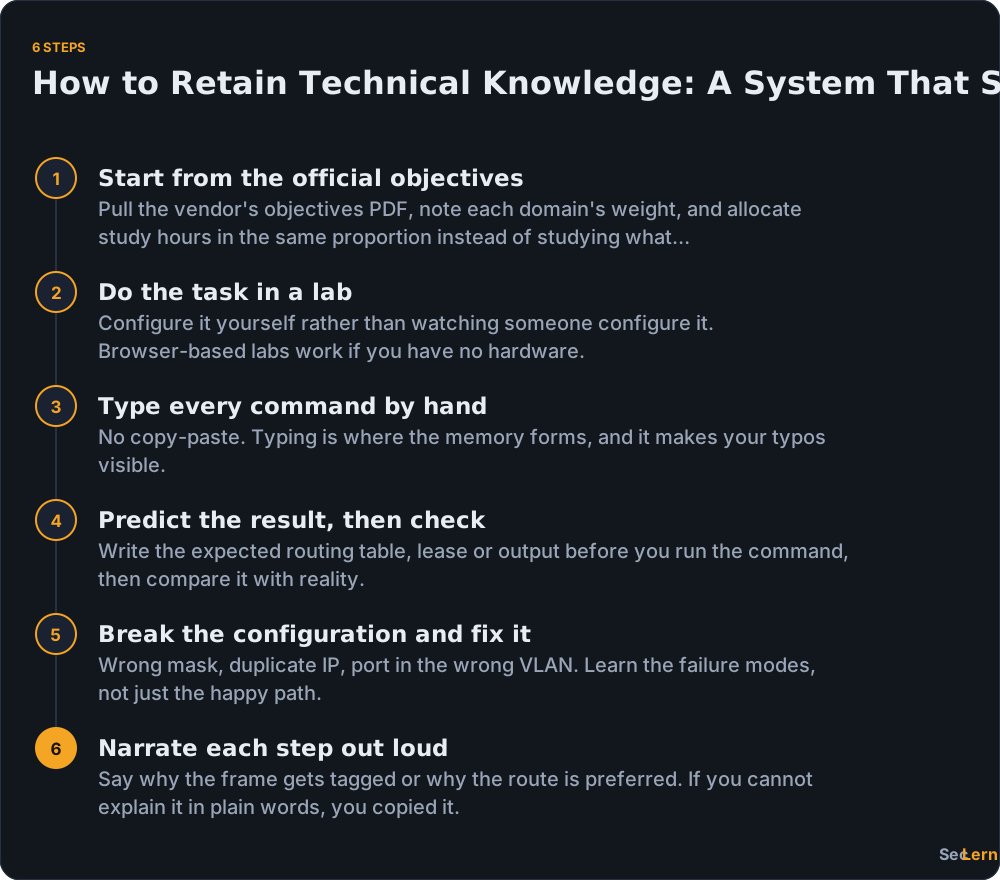
You encode technical knowledge so it sticks by doing the task in a lab, typing every command by hand, predicting the result before you check it, then breaking the configuration on purpose to learn the failure modes.
Start from the objectives. CompTIA's exam objectives list every domain and its weight, and Cisco and AWS publish the same. Security Operations is 28% of Security+ SY0-701, and Network Troubleshooting is 24% of Network+ N10-009, so those topics deserve more sessions than the smaller domains.
Do the thing instead of watching someone do it. Watching a switch get configured feels like progress and leaves almost nothing behind. Build it yourself in browser-based hands-on labs if you have no hardware, and type every command by hand. Copy-paste skips the part where memory forms and hides the typos you would spend 20 minutes on in a real ticket.
Predict, then check. Write down the expected routing table or DHCP lease before you run the command. Wrong predictions are the most valuable lines in your notes.
Break it and fix it. A wrong mask, a duplicate IP, a port in the wrong VLAN. The happy path teaches one state; the failures teach you where to look.
Say each step out loud. If you cannot narrate why the frame gets tagged, you were copying, not learning.
Exam versions, weights and prices change, so confirm them on the vendor page before you book.
How does spaced repetition work for technical knowledge?
Spaced repetition works for technical knowledge when you space retrieval rather than rereading: you pull the fact from memory at growing intervals and only then check yourself. Anki's manual describes its scheduler in exactly those terms, with intervals growing each time you successfully recall a card.
| Review point | What you do | Time (estimate) | Security+ example |
|---|---|---|---|
| Day 1 | Blank-page recall, then check | 10-15 min | Write the five SY0-701 domains from memory |
| Day 3 | 10-15 practice questions | 15 min | Ports: 443/TCP, 22/TCP, 3389/TCP, 53/UDP |
| Day 7 | Cold lab redo, no notes | 30-45 min | Rebuild a small screened subnet |
| Day 21 | New scenario or a PBQ | 15-20 min | Drag-and-drop PBQ on network segmentation |
| Day 60 | Teach-back | 10-15 min | Explain defense in depth in two minutes |
- What belongs on a card: ports and the services they carry, acronyms (SIEM, SAML, RADIUS), subnet math, command syntax such as
show ip route, and one-line "why use this control" answers. - What does not: whole procedures and broad concepts such as how OSPF converges. Those need a lab or a whiteboard.
Keep cards atomic, put the reasoning on the back, and shorten or stretch intervals by difficulty. Missing a day is fine: pick up where you left off instead of restarting. Anki is the default tool here and free on desktop; Quizlet is quicker to set up with shared definition sets but gives you less control over scheduling.
How do you use practice questions and PBQs for retrieval, not scorekeeping?
Use practice questions as retrieval, not scorekeeping: answer before you check, write down why you chose that answer, log every miss with the underlying rule, and re-test it on a set date.
- Write the reason, not just the letter. One sentence on why the answer is right and why the closest wrong option is not. That sentence is the study, not the score.
- Every miss goes into the error log. Question, why I missed it, the correct rule, the re-test date. A miss you do not log is a miss you will repeat.
- Redo PBQs cold, weeks later. Performance-based questions are the closest thing to the job. Redoing one the same afternoon tests short-term memory; redoing it on day 21 tests whether you learned it. See CompTIA PBQ practice.
- Timed simulations are diagnostics. Book three: start, midpoint and final week. Security+ SY0-701 is a maximum of 90 questions in 90 minutes (CompTIA), Network+ N10-009 is 90 in 90 with a passing score of 720 (CompTIA), and AWS SAA-C03 is 65 questions in 130 minutes (AWS). A simulation every day measures fatigue, not readiness.
- Let the error log pick the next session. Most people drill the topics they already like.
What notes actually help you retain technical knowledge?
Notes help you retain technical knowledge only when you quiz yourself from them. Four formats earn their space.
- A blank-page dump per topic. Close everything, write what you remember on one page, then open the notes and mark the gaps in red. The gaps are next week's study plan.
- The error log from your practice sessions. Quiz yourself from it: cover the rule column, answer each line from memory, then check. A log you reread is a diary; a log you quiz yourself from is a study tool.
- A command sheet you typed yourself.
ip addr,ipconfig /all,show ip interface brief. The typing is the point; a downloaded cheat sheet teaches nothing. - An explain-it-to-a-beginner paragraph. One paragraph per topic, no jargon. If you cannot write it, you do not have it yet.
Stop transcribing slides, because that is storage, not learning. The container does not matter either: Obsidian, Notion, a text file or paper all work. A note you never quiz yourself from is a filing cabinet, not a study method. For what to record from a lab session, see operating system labs.
How do you fit retention practice into a full-time schedule?
You fit retention practice into a full-time schedule by keeping 20 to 30 minutes of retrieval on workdays and one 45 to 60 minute lab block on the weekend, instead of saving everything for a long Sunday session.
Short and frequent beats long and rare, because the Tuesday block lands inside the forgetting curve instead of after it. Split the work by where you are:
- Dead time (commute, queue, lunch): flashcards and out-loud recall. An A+ candidate can drill port numbers and Windows commands there; a CCNA candidate can recite spanning-tree port states.
- Desk time (evening, early morning): labs, practice questions, the error log.
- Weekend block: one cold lab redo and a 10-question self-test.
A week looks like this. Monday through Friday, 20 to 30 minutes of retrieval, alternating flashcards and questions. Saturday, 45 to 60 minutes in a lab. Sunday, 20 minutes on the error log and next week's topics. One weekend a month, rebuild an old lab with no notes.
If the calendar is the hard part, how to study while working full time covers the scheduling side.

How do you retain technical knowledge after the exam?
You retain technical knowledge after the exam by booking a monthly maintenance slot before motivation fades, rebuilding one lab from scratch with no notes, applying the skill to something real, and teaching it to someone else.
- Book the slot before results day. One recurring 45-minute block a month. The week after the exam is when intentions are strongest, and also when they slip.
- Rebuild one lab from scratch, no notes. Pick the one that scared you. If it goes back together cold, you kept it.
- Apply it to something real. A home lab, a work ticket, a small script. A skill with no outlet decays fastest.
- Teach it. Write an internal doc, answer a forum question, walk a colleague through it. Teaching is the retrieval test you cannot fake.
- Check the current version and your continuing education requirements. Objectives are versioned, and CompTIA, Cisco and ISC2 each set their own recertification rules. Confirm the numbers on the vendor's page rather than a blog post, and compare versions with a version comparison tool before you rebook anything.
Which retention mistakes should you stop making?
The retention mistakes that cost the most are rereading and highlighting, watching videos at 2x without touching a lab, cramming the final week, and re-testing only the topics you already know.
| Mistake | Why it fails | Fix |
|---|---|---|
| Rereading and highlighting | Builds recognition, not recall | Close the book and dump the page from memory |
| Watching videos at 2x | Passive input leaves no procedure behind | Pause once per video and do the task |
| Cramming the final week | Fits the exam, not the job | Start retrieval on day 1 and keep sessions short |
| Paragraph-long flashcards | You memorize sentences, not facts | One fact per card, reasoning on the back |
| Re-testing only strong topics | Confirms what you know and hides what you do not | Let the error log choose the session |
| Never redoing a lab | The skill fades quietly | Rebuild one lab cold every month |
| Skipping the explanation after a right answer | Right for the wrong reason is still wrong | Read every explanation, correct or not |
| Taking notes on everything | Transcription eats retrieval time | Record only gaps, errors and commands |
If the full system feels heavy, shrink it. One lab, one blank-page recall and one error log entry a day is the smallest version that still works, and it is the version you will actually do on a Wednesday night.
Our perspective
We built SecLern around a blunt observation: more material is rarely the missing piece. Retrieval is. It is easy to watch twenty hours of video and feel ready; it is harder to close the browser and configure a trunk port from memory. So every practice question explains the answer, including the wrong ones, missed questions become notes and drills, and the labs run in the browser because a lab you have to build first is a lab you skip on a Tuesday night. The honest trade-off: no tool can do the spacing for you. If you do not come back on day 7 and day 21, the intervals never happen.
Practice with SecLern
SecLern covers the retrieval half of this system. Practice questions come with an explanation for every answer, right or wrong, and missed questions turn into notes and drills you can re-test on your own schedule. Hands-on labs and PBQs run in the browser on a simulated Windows, Linux and Cisco desktop, so you can encode a topic by configuring it rather than watching it. Start with the CompTIA Security+ (SY0-701) study page or browse all IT certification study pages. The free tier needs no card, and Pro is $15 a month or $99 a year with a 7-day trial (card required).
FAQ
How long does it take to retain technical knowledge?
There is no fixed number, because it depends on the topic and how you study. A fact typically needs several successful retrievals at growing intervals, and on the day 1, 3, 7, 21 and 60 schedule that stretches across about two months. Procedures take longer than facts and need lab rebuilds, not just cards.
Does spaced repetition actually work for IT certifications?
For the factual layer, yes: ports, acronyms, subnet math, command flags and objective vocabulary all stick with spaced cards. For procedures, cards alone are weak, so pair them with lab rebuilds. Anki's manual describes intervals that grow on successful recall, and that mechanic rewards short, frequent recall over long rereading sessions.
Should I take notes while watching training videos?
Not transcripts. Pause the video, write the one rule or command it taught, then do the thing in a lab before moving on. Free courses such as Professor Messer's cover CompTIA objectives well, but watching is input. Retention starts when you produce the command yourself with the video closed.
How do I remember port numbers and command syntax?
Make one card per port with the service and a reason it matters, then recall them in dead time: 443/TCP for HTTPS, 22/TCP for SSH, 3389/TCP for RDP, 53 for DNS. For syntax, type commands by hand in a lab until show ip route or ip addr comes out without thinking. A ports cheat sheet is for checking, not memorizing.
Why do I forget everything after passing the exam?
Because the study plan was built for the score, not the skill. Cramming encodes enough for a few days of recognition and little that lasts, and nothing revisits it afterward. The fix is a monthly rebuild of one lab from scratch plus one real application: a ticket, a home lab change or a short write-up.
Is it better to read documentation or do hands-on labs?
Do the lab first, then read the documentation to fill the gaps it exposes. Documentation explains the option you missed; the lab is what makes the option mean anything. Candidates who only read can describe a trunk port. Candidates who lab and then read can configure one and debug it.
Sources
- Classics in the History of Psychology: Ebbinghaus, Memory: A Contribution to Experimental Psychology
- Anki Manual: Background
- CompTIA Security+ certification page
- CompTIA Network+ certification page
- CompTIA exam objectives
- Cisco CCNA 200-301 exam topics
- AWS Certified Solutions Architect - Associate certification page